I(RSS)C - An RSS bot for IRC
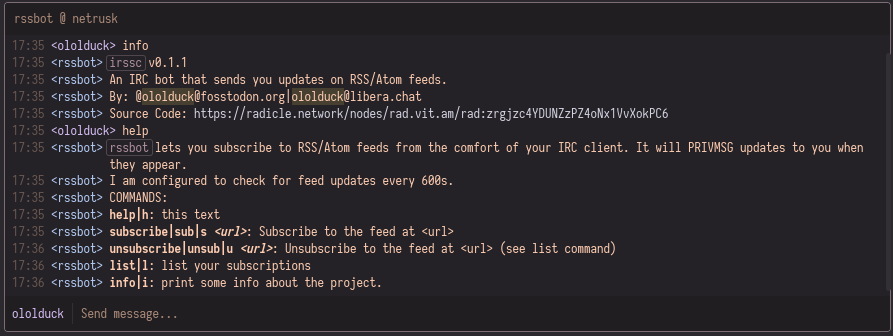
This is an IRC bot that simply checks for RSS updates to feeds you have subscribed to.
Quickstart
There's no binary releases yet, so build it from source:
# clone and build
git clone https://rad.vit.am/zrgjzc4YDUNZzPZ4oNx1VvXokPC6.git irssc && cd irssc && cargo build --release && cargo install --path=.
# copy the sample config file
cp irssc.toml{.example,}
# Edit the configuration, for instance the server you wish to connect to.
$EDITOR irssc.toml
# run irssc
irssc
Installation
Two possibilities: A, with mise-en-place and B, without mise.
A. With mise
With mise, everything is easy and smells good:
# clone the repository
git clone https://rad.vit.am/zrgjzc4YDUNZzPZ4oNx1VvXokPC6.git irssc && cd irssc
# copy the sample files
cp irssc.toml{.example,}
cp systemd.service{.example,}
# edit them to suit your preferences
$EDITOR irssc.toml systemd.service
# OPTIONAL: change the FEED_REFRESH_INTERVAL_SECONDS value in `src/main.rs` to change the feed refresh rate.
# $EDITOR src/main.rs
# install the system dependencies
apt update && apt install build-essential pkg-config
# then, run the deployment
sudo mise deploy # will do stuff and print stuff
# enable the systemd service
sudo systemctl enable --now irssc.service
B. Without mise
0. Ensure rustup is installed and has a valid rust toolchain
rustup install stable
apt update && apt install -y build-essential pkg-config
1. Clone and build the project
git clone https://rad.vit.am/zrgjzc4YDUNZzPZ4oNx1VvXokPC6.git irssc && cd irssc
cargo build --release
2. Copy and edit sample configuration files
cp irssc.toml{.example,}
cp systemd.service{.example,}
$EDITOR irssc.toml systemd.service
OPTIONAL: change the FEED_REFRESH_INTERVAL_SECONDS value in src/main.rs to change the feed refresh rate.
3. Create data directory
sudo mkdir -p /var/lib/irssc/
4. Install configuration file
sudo cp irssc.toml /etc/irssc.toml
5. Install systemd service
sudo cp systemd.service /etc/systemd/system/irssc.service
sudo systemctl daemon-reload
6. Install binary
sudo cp target/release/irssc /usr/bin/irssc
7. Enable and start the service
sudo systemctl enable --now irssc.service
Verification
Check the service status:
sudo systemctl status irssc.service
View logs:
journalctl -u irssc.service -f
If you are satisfied with your installation, you may run cargo clean to free up some space.
Contributing
Contributions are appreciated, be it in the form of bug reports or feature suggestions, or even patches. you can reach me on irc (ololduck@libera.chat) or on ActivityPub/Mastodon (@ololduck@fosstodon.org)
License: AGPL-3.0