Search results for tag #debian
![[?]](https://files.mastodon.social/accounts/avatars/116/591/339/572/514/487/original/b63661251156b1fd.png)
I can finally, reliably, create virtual machines in my #homelab with #terraform. Built on #qemu , #Debian , #golang , and #postgresql .
![[?]](https://twitter.resolvt.net/system/accounts/avatars/109/382/542/410/723/603/original/db48f9c6b5113e57.jpg)
.oO( gentlemen (re)start your engines ) https://lists.debian.org/debian-security-announce/2026/msg00482.html [SECURITY] [DSA 6568-1] linux security update
![[?]](https://social.heise.de/__virtual/accounts/avatars/109/722/110/464/209/207/original/8c6b0cc3354d3bc1.png)
Jetzt auch auf dem Desktop: Microsoft Defender schützt Linux
Microsoft Defender unterstützt Linux-Desktops im Unternehmen. Administratoren können die Geräte über ihre bestehende Infrastruktur verwalten.
#Debian #IT #Linux #Microsoft #RedHatEnterpriseLinux #Security #Ubuntu #news
![[?]](https://social.blake-hofer.net/system/accounts/avatars/117/445/715/770/173/957/original/2eef21828ae97fef.png)
Hello World! 🐧✨
Meine eigene kleine Mastodon-Instanz steht. Frisches Debian, Nginx, Rails und Sidekiq gezähmt – jetzt bin ich offiziell Teil des Fediverse.
Hier geht es künftig um Linux, Homelab-Spielereien, Code, EVE Online/Echoes und das alltägliche Nerd-Leben.
🌐 Blog: https://blake-hofer.net
💼 IT: https://blake-hofer.ch
#Neuhier #Introduction #Debian #SelfHosted #Linux #EveOnline #NerdStuff
![[?]](https://social.mdosch.de/martin/s/52bf05e4184797def7ae4fb8b34ea68e.png)
I wonder whether #debian might better follow #chromium ESR for stable, as they do for #Firefox. 🤔
@Andres4NY@social.ridetrans.it
![[?]](https://media.universeodon.com/accounts/avatars/114/984/213/506/777/707/original/6801673959563512.jpeg)
Została wydana nowa wersja Ubuntu 26.10 o nazwie kodowej „Stonking Stingray”. Ubuntu to dystrybucja Linuksa typu live, powstała na bazie Debiana, z możliwością instalacji na dysku twardym lub pamięci przenośnej, przeznaczona na... https://linuxiarze.pl/ubuntu-26-10/ #ubuntu #debian #linux

![[?]](https://static.mamot.fr/accounts/avatars/000/004/942/original/3a90cfdbe3e2b4f7.jpg)
The recording of my #AllSystemsGo 2026 talk is up: “Immutable, Fully-Confined Debian Server Images, Even on a Raspberry Pi 3”.
A minimal Debian server built with mkosi and apparmor.d: UKI, A/B updates, dm-verity, a whole-system #AppArmor policy and an immutable /etc from signed confext images. Same image on x86-64 and a Pi 3, with different attacker models.
Video: https://www.youtube.com/watch?v=5Kft4nlDKR8
Slides: https://cfp.all-systems-go.io/all-systems-go-2026/talk/KJNYQ8/
![[?]](https://mastodata.s3.de.io.cloud.ovh.net/accounts/avatars/113/555/339/731/946/913/original/5bdaa7a43c3dad7e.jpg)
💻 Frage an die FOSS-Gemeinde: Wie haltet ihr es mit KI beim Programmieren?
Debian hat im August entschieden: weder Verbot noch Freibrief, die Verantwortung bleibt bei den Menschen. Papst Leo XIV. mahnt in seiner Enzyklika „Magnifica Humanitas" sinngemäß: KI darf Menschlichkeit und eigenes Denken nicht verdrängen.
Wo liegen für euch die Grenzen? Ich selbst nutze openSUSE Leap 16. Und ihr? 🐧
![[?]](https://social.anoxinon.de/system/accounts/avatars/110/961/717/175/355/540/original/aaa8e449590df717.png)
Raspberry Pi Desktop für x86 nach vier Jahren aktualisiert
https://linuxnews.de/raspberry-pi-desktop-fuer-x86-nach-vier-jahren-aktualisiert/ #raspberrypi #debian #linux #linuxnews
I voted #Linux as I am a #Debian user, but I would not see this as choosing a side as I don't care what OS people use to get their things done.
![[?]](https://media.infosec.exchange/infosec.exchange/accounts/avatars/116/797/276/219/291/526/original/96271e701c673af9.png)
Explore the massive Raspberry Pi Desktop update. The OS returns for PC and Mac, skipping to Debian 13 and migrating to a mandatory 64-bit architecture.
![[?]](https://media.bsd.cafe/bsdmmedia01/accounts/avatars/117/230/143/862/280/275/original/75b1d589e4dbfae6.jpg)
Let's settle this once and for all! 👻
Linux vs. BSD! 😈
Which side are you on? 🐧🐡
#Linux #Debian #Arch #ArchLinux #Fedora #FedoraLinux #BSD #OpenBSD #FreeBSD #NetBSD
| Linux (Debian, Arch, Fedora, etc.): | 8 |
| BSD (OpenBSD, FreeBSD, NetBSD, etc.): | 5 |
![[?]](https://alteholz.social/system/accounts/avatars/108/289/281/671/501/445/original/f8d1414c3912c86a.jpg)
![[?]](https://media.infosec.exchange/infosec.exchange/accounts/avatars/109/320/160/724/419/396/original/b9824bf0151d55db.png)
Linux, refined. 🐧
OhMyDebn 4.11.0 is out! It turns your Debian-based distro into a polished Cinnamon desktop: optional tiling, 23 themes, and AI coding agents one keypress away.
In this release: 32 fixes and 7 app updates.
Free and open source.
![[?]](https://mastodon.acc.sunet.se/system/accounts/avatars/000/000/001/original/d9d80a0c5f502f5c.jpg)


![[?]](https://files.mastodon.social/accounts/avatars/000/310/737/original/00f330cee1c9745a.jpg)
#Introduction I joined after Cambridge Analytica and came back after reading Enshittification. I'm mostly here to enjoy the community and expand what that means beyond the people I usually interact with. I started using #linux with redhat 5.2 but mostly #debian since. I've worked with #PowerElectronics for about 13 years. I like sharing what I know. And I like celebrating what others find interesting. I live in #Seattle and if you do too I'll probably follow you. I volunteer at a tool library.
![[?]](https://socialbc.ca/system/accounts/avatars/113/131/408/955/858/723/original/5902f75c227dd76f.jpeg)
Well this is a problem… #footiMac won’t boot. It is trying to run fsck on disk before booting but seems to time out after only about 25% and the screen goes blank, requiring a restart which just does the same.
Am I going to have to take the SSD out of this thing and modify fstab to get it to boot? ugh.
and now the wifi stations are grumpy. ok this is not how holiday Mondays are supposed to be. this feels like work. 😝 😿 #footiMac #mastoadmin #Debian
![[?]](https://cf-ap.com/api/media/avatars/manalejandro.png)
![[?]](https://o.mastodon.au/accounts/avatars/109/877/980/876/007/292/original/898aa72ab06ce2f0.png)
This udev bug is really annoying, when upgrading from U2404 to U2604 (or Debian Bookworm to Trixie) - udev loses its /dev/disk/by-id NAMES, and needs a bunch of hand-holding to fix.
#Debian doesn't seem to care
https://bugs.launchpad.net/ubuntu/+source/sg3-utils/+bug/2137191
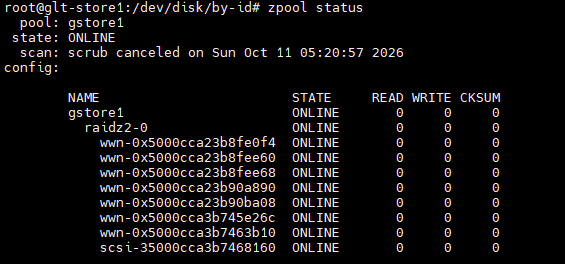
Alt...
zpool status with the wrong device names
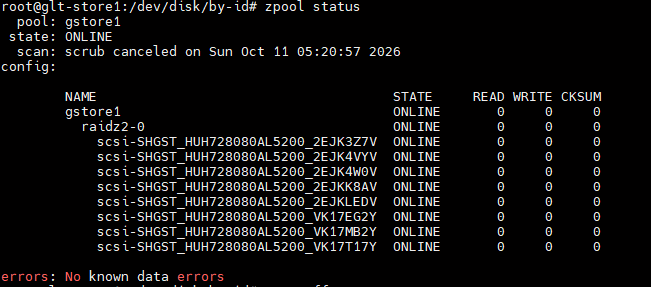
Alt...
zpool status after I had fixed the udev rules so they have the correct names
![[?]](https://cdn.fosstodon.org/accounts/avatars/109/133/018/532/080/029/original/f5ddb69f7aa8e271.png)
Hi everyone! 
For our upcoming ISO refreshes, we’re shifting from X11 to XLibre.
Xorg is basically in maintenance mode, XLibre is actively getting updates, security patches, and features. Plus, we're sticking with X for the foreseeable future looks like XFCE is supporting both X and Wayland ❤️
If you would like to test our latest build based on (Debian) here is the link.
https://nightly.peppermintos.org/deb64/flagship/
#Linux #PeppermintOS #XLibre #Debian #Devuan #XFCE #OpenSource
![[?]](https://social.dennishilk.com/fileserver/01T9VVPFW0CG2W3T19MS1EVDYH/attachment/original/01M4EC608V99N0X22X0M8HEXK7.png)
**NEBUVERSE – Mein eigenes Stück Fediverse**
Darin geht’s um meine eigene kleine GoToSocial-Instanz auf Worldnode:
Warum ich sie gebaut habe, wie ich GoToSocial ohne Docker auf Debian 13 eingerichtet habe, wie WebFinger, Relays und nginx zusammenspielen – und wie ich Speicherverbrauch, Backups und Restore-Tests gelöst habe.
Kein „Selfhosting ist Magie“-Gelaber, sondern mein echter Aufbau mit echten Messwerten und den Dingen, über die man beim Basteln wirklich stolpert.
🔗 https://www.dennishilk.com/de/blog/nebuverse-gotosocial-selbst-hosten/
#Fediverse #Mastodon #GoToSocial #SelfHosting #Linux #Debian #OpenSource #Homelab #ActivityPub #WebFinger

Alt...
Collage-Grafik zum Blogartikel über NEBUVERSE. Groß im Bild steht „NEBUVERSE – Mein eigenes Stück Fediverse“. Daneben sind mehrere echte Screenshots der selbst gehosteten GoToSocial-Instanz zu sehen: das öffentliche Profil, die Einstellungen, die Speicher-Telemetrie und die Instanz-Startseite. Unten stehen die Hinweise „realer Aufbau“, „getestete Backups“ und „echte Metriken“. Das Design ist dunkelblau mit technischen UI-Elementen.
![[?]](https://cdn.social.linux.pizza/system/accounts/avatars/109/132/900/180/602/528/original/a56dce0909c32974.jpg)



After a few weeks with Debian Stable, I decided yesterday to switch to Debian Testing after all. On more modern computers, it really does make a difference whether I have kernel 6.3 or 7.2 available or can use significantly more up-to-date packages.
Last month I also played around with Debian Sid, and it was absolutely stable for me, though the constant updates—often several times a day—were annoying. So Testing is the perfect compromise for me.
Let me just say this: I still consider Fedora to be the best Linux distribution from a technical standpoint—the absolute gold standard. But unfortunately, in 2026, the world looks like this: Fedora = Red Hat = IBM = Big Tech = USA = Trump. And I absolutely don’t want to use anything from Trump’s shithole country anymore.
#linux #debian #fedora #opensource #freesoftware #usa #trump #surveillance #bigtech
![[?]](https://media.infosec.exchange/infosec.exchange/accounts/avatars/000/070/798/original/d20ead2f85c91066.jpg)
So in my experience getting #debian onto my Macbook 2015 ended up without any encryption on the local disk. Performance with LVM was abyssmal. Installing with ZFS on root left me with an unusable system. Something about the way debbootstrap installed during the instructions left me with a version of Linux that could not access the Apple USB devices. It would boot and the kernel would throw a bunch of USB device errors, and it wouldn't recogize the built-in keyboard, so I couldn't even login.
A standard Debian install works fine.
So #debian13 is running just fine. But this is a slow machine. I discovered a tool called eatmydata. It basically shims calls to fsync() system calls and does a no-op instead. (😱) What could possibly go wrong?
But running sudo eatmydata apt install blah blah blah runs way faster than the equivalent apt command.
It has breathed new life into this laptop.
![[?]](https://media.mas.to/accounts/avatars/109/289/036/241/267/289/original/f3b1191b82e090e9.png)
So, #Fedora puts extensions into its "Fedora Flatpak" version of #GnomeTweaks that can't be removed.
This is enclosure shit. I got off corporate software to avoid this.
I need to figure out how to install #Debian on a T2 MacBook.
#Linux #Gnome #FOSS #FLOSS #OpenSource #Computers #tech #technology
![[?]](https://cdn.masto.host/floss/accounts/avatars/000/143/204/original/94403efd0b47ed2b.jpg)
#Linux Weekly Roundup for October 4th, 2026: #COSMIC 1.10, #RaspberryPi Desktop, #NVIDIA 615.78.08, Raspberry Pi Imager 2.0.12, #Q4OS 6.10, #Ventoy 1.1.18, #KDE Gear 26.08.2, #OpenVPN 2.7.8, Raspberry Pi OS, #Calibre 9.16, #GStreamer 1.28.8, #GNOME 52 release date, KDE Frameworks 6.31, #Ubuntu Summit 26.10, #Blender 5.3 beta, #Debian 14 artwork, and more https://9to5linux.com/9to5linux-weekly-roundup-october-11th-2026

Alt...
9to5Linux Weekly Roundup - October 11th, 2026
![[?]](https://stockage.framapiaf.org/framapiaf/accounts/avatars/000/207/151/original/f64bb1e0a97142da.png)
Yet another MiniDebConf?! YES! MiniDebConf Beijing will happen on October 24th and the Call for Proposals is still open until October 15th, so go check it out and submit a talk about Debian!!! https://beijing2026.mini.debconf.org/contribute/cfp/ #debian #MiniDebConf #MiniDebConfBeijing2026
![[?]](https://static.mamot.fr/accounts/avatars/000/006/840/original/73b1609bd266f29b.jpg)
RE: https://infosec.exchange/@david_chisnall/117421676613870108
Hey #debian  folks,
Same
Stefano Marinelli boosted
David Chisnall (*Now with 50% more sarcasm!*) » 🌐
@david_chisnall@infosec.exchangeRE: https://mastodon.sdf.org/@netbsd/117396625341557692
Hey #FreeBSD folks, NetBSD hit more than double their funding target after adopting a strong no-LLMs policy. Something to think about while you draft yours, perhaps?
![[?]](https://mastodon.sdf.org/system/accounts/avatars/108/233/134/134/174/252/original/75cf6c02b16edbb2.png)
![[?]](https://media.infosec.exchange/infosec.exchange/accounts/avatars/115/325/375/966/519/149/original/dc6d6355831ed5fd.png)
Now I have buildroot built RPi5 image, which will serve MicroSD stored debian mirror and pxe boot for fully handsfree preseed installation. This combination serves offline situations, where you need to (re)install debian for your preseeding preferences.
#preparedness #offline #debian #buildroot
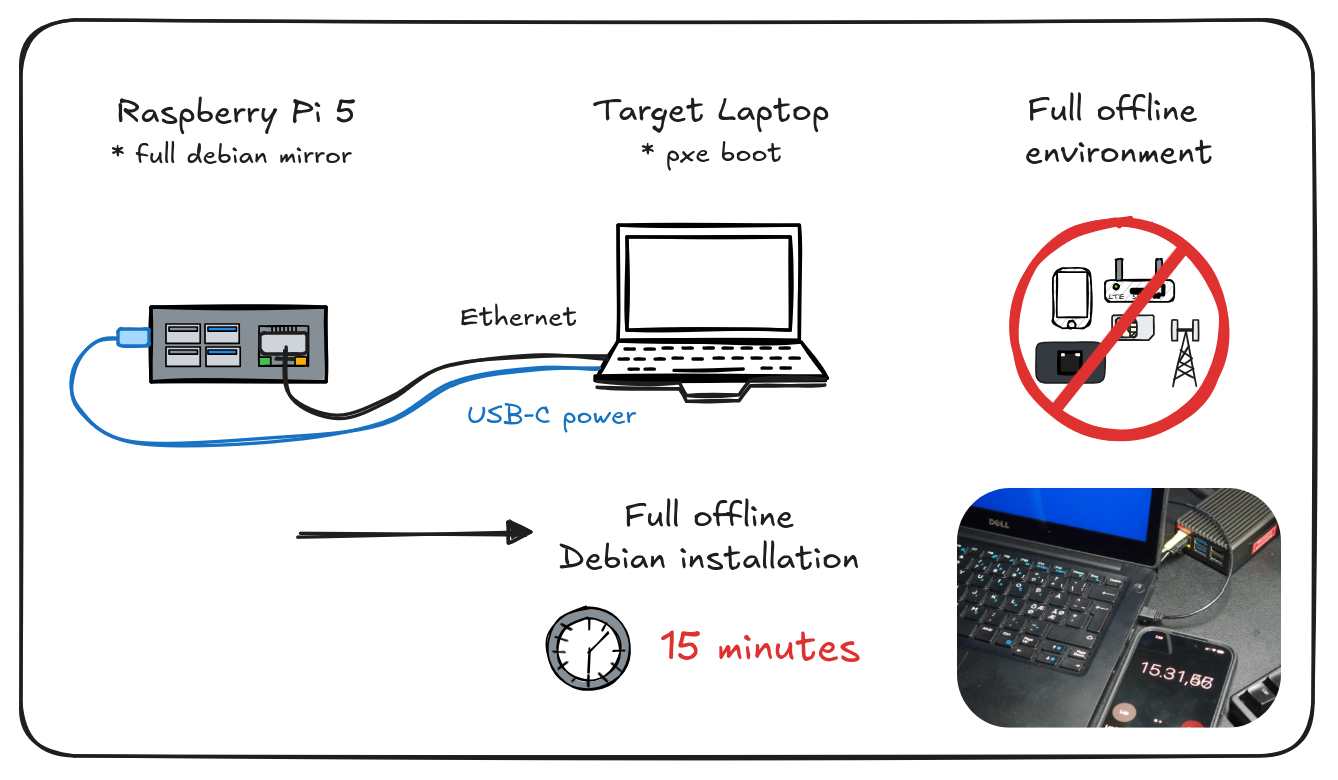
Alt...
Illustration of RPi5 connected to laptop via Ethernet for fully offline PXE boot debian installation. Time consumed, 15 minutes.
Doing a #debian #linux install on an older #Macbook (2015) and I went with the easy option of encryption on LVM on root. Performance was unbearable. I'm now following @dwarmstrong 's instructions on how to do encrypted ZFS on root. The performance impact of the encryption isn't even noticeable.
Running the live debian off the USB with the encrypted ZFS mounted during the install runs faster than encrypted LVM running native on the laptop.
![[?]](https://cdn.masto.host/lsnglus/accounts/avatars/000/000/002/original/487cae6a93e9ba55.jpeg)
![[?]](https://files.mastodon.social/accounts/avatars/000/155/698/original/45671137a1f3c90a.png)
🎤 Upcoming at SeaGL 2026:
📍 11:30 AM on October 23
🗣️ "From E-Waste to Empowerment: The Story of The Computer Upcycle Project"
👥 Speaker(s): Mike Kelly
📍 Room: Room 250
🏷️ Track: Everything Else
📝 A small effort to keep old laptops out of landfills grew into The Computer Upcycle Project, a commun...
#SeaGL2026 #tech #ewaste #fedora #debian #linux
🔗 https://pretalx.seagl.org/2026/talk/DEKVE9/
![[?]](https://media.bsd.cafe/bsdmmedia01/accounts/avatars/110/753/691/400/011/788/original/7decba5a2514dda4.png)
![[?]](https://cdn.masto.host/rubysocial/accounts/avatars/000/093/360/original/920f5a8782200f9b.jpg)
Today I tried to install #NetBSD 11 on an old Acer E15 laptop that I had been using as a #Debian CLI-only system.
The install was a little dicey. First one failed, but the second time I was able to go all the way through and configure WiFi on the Edimax N150 USB. I kept getting errors in the console about the BIOS (likely related to the battery, which is pretty dodgy).
X started but really didn't run. I could try messing with it, but I'll probably go to #OpenBSD next.
![[?]](https://files.mastodon.social/accounts/avatars/000/842/900/original/a1d6b1ca4acfe883.jpg)
❓ ❓ ❓ Beliebte Klischees aus der #Linux-Community ❓ ❓ ❓
> Rechts: #Gentoo – alles selbst kompilieren, keine Kompromisse, der Staat hat im Kernel nichts verloren. Dazu /g/-Ästhetik wie #Void Linux.
> Links: #Debian mit Social Contract, #Tails für Aktivist:innen, #Trisquel für Freiheit als moralische Frage.
Die echte Konfessionslinie verläuft aber nicht links/rechts, sondern systemd ja/nein.
Und #Mint? Da sind alle, Hauptsache es läuft. 🐧
AND YOU MY FRIEND ❓ >> ❣️
Dodane do bazy: CookieOS. CookieOS to dystrybucja systemu Linux, oparta na stabilnej gałęzi Debiana. Projekt udostępnia niewielki obraz typu live, który po uruchomieniu... https://linuxiarze.pl/distro-cookieos/ #linux #debian

![[?]](https://media.infosec.exchange/infosec.exchange/accounts/avatars/109/383/657/165/795/206/original/f174a89e0afc3a2b.png)
![[?]](https://media.infosec.exchange/infosec.exchange/accounts/avatars/115/930/959/045/427/278/original/10f9da5ca0608585.jpeg)
They can do with AI-generated tool without human volunteers for free. 🤖️ 🤷️
https://arstechnica.com/gadgets/2026/10/your-artwork-could-be-featured-in-the-next-debian-release/
![[?]](https://mastodon.tn/system/accounts/avatars/117/059/739/311/891/872/original/4595127310e2c453.jpg)
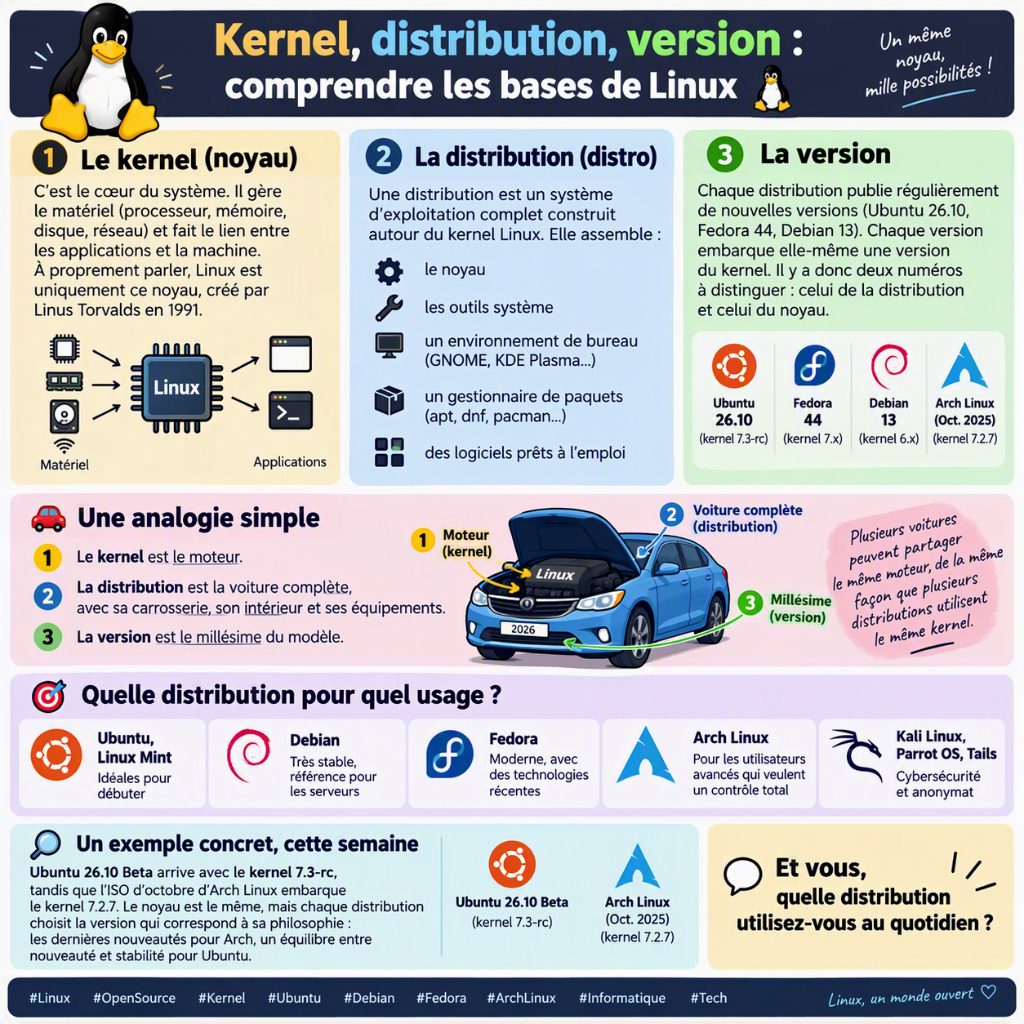
Kernel, distribution, version : comprendre les bases de Linux 🐧
#Linux #OpenSource #Kernel #Ubuntu #Debian #Fedora #ArchLinux #Informatique #Tech
![[?]](https://media.bsd.cafe/bsdmmedia01/accounts/avatars/110/740/169/477/916/693/original/dfa8f1b9beefa405.png)
![[?]](https://media.mas.to/accounts/avatars/109/257/782/673/312/652/original/b484b674256414dd.png)
New blog post: Debian Code Search: Fast TurboPFor with Go SIMD 🥳
This August, I accomplished what I wanted for many years: I deleted the last cgo dependency in Debian Code Search! This was made possible by Go’s recently introduced SIMD support, because now we can implement the TurboPFor integer compression format as efficiently — more efficiently, in fact, by using the newer AVX512 instruction set! — as the reference implementation.
https://michael.stapelberg.ch/posts/2026-09-06-dcs-fast-turbopfor-go-simd/

Alt...
screenshot of my blog post “Debian Code Search: Fast TurboPFor with Go SIMD”
![[?]](https://media.bsd.network/accounts/avatars/000/006/949/original/9592eac6e5018e39.png)

Sending good vibes to everyone in the Debian community navigating the recent transitions. If you're using this moment to do a little distro-hopping, consider jumping over to the BSD side. NetBSD offers a completely independent codebase built on a classic, predictable philosophy. You might just find your new permanent home! 🚩💻
#NetBSD #Debian #FOSS #noai #TechCommunity #antiai
![[?]](https://fedifreu.de/system/accounts/avatars/112/893/525/568/348/229/original/bef80c18118fb204.jpg)
Debian developer Antoine Le Gonidec just quit the project over its decision not to ban #LLM-assisted code contributions:
Pretending to have a "neutral stance" when faced with fascism is not neutrality, it’s active collaboration.
AI slop is fascism materialized. Stop it whenever you can!
Source: https://lists.debian.org/debian-project/2026/08/msg00041.html
![[?]](https://cdn.masto.host/indiewebsocial/accounts/avatars/112/536/017/792/352/435/original/a87e9128d6303e02.png)
「 What LLMs in Debian development will do, I fear, is eliminate any incentive to scrap boilerplate or reform policies that require a lot of other senseless human effort. If I had had access to LLMs 30 years ago, I might have just had them generate the rules files, replate with complexity. So they will make Debian even more firmly what it is, and ever less likely to explore what it could become 」
![[?]](https://files.mastodon.social/accounts/avatars/000/010/947/original/34a579358b5060ee.png)
Debian Linux developers vote to allow "Responsible Use of Generative AI" https://www.gamingonlinux.com/2026/08/debian-linux-developers-vote-to-allow-responsible-use-of-generative-ai/
Milestone achieved! For Debian Code Search, I no longer need to use cgo to link in the AVX2-optimized TurboPFor C library that powers our index since 2019: https://michael.stapelberg.ch/posts/2019-09-29-dcs-positional-turbopfor-index/
Instead, thanks to Go 1.27’s SIMD support, I can use AVX2 (and AVX512) natively from Go :)
Turns out that upstream C TurboPFor does not use AVX512 yet, so my Go implementation is now *faster* than C (for our use-case) 😲
So, as of today, Debian Code Search is running with CGO_ENABLED=0 (and GOEXPERIMENT=simd GOAMD64=v3) 🎉
A blog post with more details is in the works, if you’re curious. Let me know if you run into any bugs.