Search results for tag #smolweb
![[?]](https://gone.lema.org/fileserver/01AGG3YT2F4M3S9YGAKRQAP768/attachment/original/01K2QJ616KA8K531FV56FRH7A3.png)
 👾
👾If we have to learn one thing from all the LLM (mis?)adventure that has hit our civilization: most of the existing knowledge can be expressed in a text file. You know, like most books. Just plain text.
And you have to ask yourself why the dominant information access method - the creation of Google, the world's largest advertising company - is a tool made of millions of lines of code , able to run even more code with extremely complex layout systems.
We run humanity's knowlege on an advertising platform.
So maybe have a look at #GeminiProtocol #Gopher #smolweb and shit. Ask* your governments to make smolweb compatible websites.
* ask, with a pitchfork
![[?]](https://media.mas.to/accounts/avatars/109/305/969/366/397/563/original/125154463787e947.png)

RE: https://infosec.exchange/@Em0nM4stodon/117066506009210864
Bring back Web 1.0. Or maybe even Web 0.x.
![[?]](https://media.gamepad.club/accounts/avatars/116/105/231/861/657/634/original/487b53db58d81b5c.jpg)
Weekly shoutout to #smolweb and #geminiProtocol ! Been having so much fun finding like minded geminauts. I really want to make my own capsule, maybe this winter !!
![[?]](https://m.danq.me/system/accounts/avatars/109/291/464/085/694/081/original/9492382c44737919.png)
You don't have to blog like me.
You don't have to differentiate by post kind.
You don't have to put full contents in your feed.
You don't have to keep a library of "maybe-some-day"
drafts so long that you'll never reach the bottom.
You don't have to have a comments form.
Or reactions. Or webmentions.
Or a guestbook. Or drawings?
(But give me some way to say "hi, you're cool!")
You don't have to have a feature image.
You don't have to keep posts up forever.
You don't have to have tags.
You don't have to syndicate to the socials.
You don't have to stick to one topic.
Or three. Or seventeen.
Or be able to answer "what's your blog about?"
It's yours, and that's enough.
You don't have to post on a schedule.
You don't have to use your real name.
You don't have to have a podcast.
You don't have to tell everybody.
You don't have to use any particular tool.
Bloggers who spend their time arguing
About ClassicPress vs WriteFreely vs Bear vs Middleman
Could be reading and writing instead.
You don't have to have a plan to "monetize".
You don't have to write your own theme.
You don't have to be run your own server.
You don't have to make every post your best.
You just have to blog.
The Internet is ours.
It belongs to the humans.
Not to the companies and the robots.
To us.
And every human voice.
Every single human voice.
Makes the world a little richer.
You don't have to blog like me.
(You don't have to use "blog" as a verb.)
You just have to blog.
![[?]](https://s3.c.im/accounts/avatars/109/308/711/020/000/246/original/cebd4a1591c00fab.png)
The small, real, original web https://spacetimetech.wordpress.com/2026/07/19/the-small-real-original-web
Got my post on the small web done- it links to sites by @rootcompute and @stefan, a directory by @ttntm, and blogs by @HailsandAles, @ploum, @reedandpickup, @derthomas, @fribbledom, and @j9t
Also tagging these folks from when I mentioned it before, hope I got everyone, apologies if I didn't!
@allen @tk @wendigo @enocc @unfunnyryan @donutage @farrisswisher @chris @cb @irgndsondepp @hl @Tijn @isocat @mastosalo @unusnemo @shivering_wreck @RadicalSocialWorker @vlrny @rushey @librarymonster @shellsharks @RobinMarx @82mhz @BonfireAtNight
#SmallWeb #IndieWeb #PersonalWebsites #blogs #blogging #writing #smolweb #indie #HumanWeb #GeminiProtocol #Gopher #WebHistory #InternetHistory #future
![[?]](data:image/png;base64, iVBORw0KGgoAAAANSUhEUgAAAEAAAABAAQAAAACCEkxzAAAAUUlEQVQoz43R0QkAMQwCUDdw/y3dwEvsvzlL4X1IoQkAisKmwfAFT3RgJHbQezpSRoXEqeqCL9BJBf7h3QbOCCxV5EVWMEMwG7K1/WODtlvxAYTtEsDU9F34AAAAAElFTkSuQmCC)
I felt a modicum of motivation yesterday so I wrote a spartan client in zig. Although there's currently a bug where it doesn't read the whole response (I think I used the wrong streaming method). Honestly, it's kind of freeing having a compiler check my work.
If the motivation persists, I might do nex next, or maybe I'll add some formatting for gem-text. I don't know if I'm going to go to through the hassel of dealing with certs.
![[?]](https://mastodon.uy/system/accounts/avatars/109/325/423/823/131/242/original/1de9b23f4dc5eb55.jpg)
Agosto es el mes de la nostalgia en Uruguay. Más vale prepararse con tiempo.
Nuevo post en la cápsula gemini con todo lo que querías saber sobre la noche de la nostalgia pero temías preguntar.
Música retro, retrocompucación, juegos retro y más.
gemini://undernet.uy/~daniel/nostalgia.gmi
#Uruguay #nostalgia #agosto #geminispace #geminiprotocol #smolweb #undernet
#retro #retrocomputacion #músicaretro #80s #juegos
![[?]](https://i0.wp.com/rbfirehose.com/wp-content/uploads/2021/01/cropped-Blank-512-x-512.png?fit=512%2C512&ssl=1)
Petrapixel is building an Indie Web Database. “The Indie Web Database is a collection of all things indie web. For now, we have a collection of websites, webrings and cliques. The database is a project created and managed by Petrapixel (that’s me, hi!), but contributions can come from everyone. This way, the maintenance of the database is not depended on one person, but a task of the community. […]
https://rbfirehose.com/2026/07/05/petrapixel-indie-web-database/¿Les conté que agregué un feed rss a mi cápsula gemini en el tilde undernet?
No se preocupen, ahí dentro (gemini://undernet.uy/~daniel) tienen también como configurar newsboat para estar al día.
https://cellsinspace.neocities.org/daniel.rss
#rss #undernet #geminiprotocol #geminispace #smolweb #Uruguay
#tilde #espanol #newsboat
![[?]](https://static.piaille.fr/accounts/avatars/109/270/733/443/924/639/original/c2242bfdfd093dd4.png)
![[?]](https://vit.am/snac/ololduck/s/avatar-766707d3d7101a2681f0a44e4983a895.png)
Abbaye is a Static Site Generator (#SSG) for your #software releases, for those of us who can't or won't use a full-featured software forge.
Big release!
Some refactoring to make the code easier to maintain, some small bugfixes (mainly introduced by the new features :p).
But the star features of this release are:
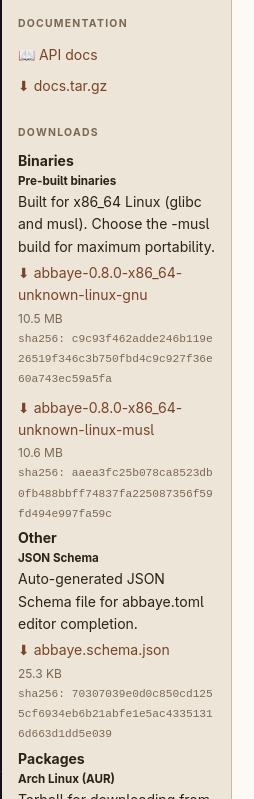
- Artifact categories and naming: artifacts are now categorized and named consistently, making it easier to understand what each artifact is for, if you choose to do so. It is done via the new
[[builder]]category,nameandcommentkeys in the configuration file. - Add multi-format support. It's still in the early stages but it's functional and supports HTML or Gemtext (for all my #smolweb folks out there).
- Add support for non-interactive terminals, as in the case of a CI/CD pipeline. You'll still see progress via some log messages and not be stuck on a black screen without any information! (note: this requires the use of
abbaye --verbose)
abbaye self-update to get the latest version.Here's Abbaye's 0.8.0 page, as built with Abbaye itself: https://vit.am/~ololduck/abbaye/0.8.0/
#Rust #SmallWeb #Rustlang #StaticSiteGenerator
Alt...
view of abbaye's revamped sidebar where you can see that downloadable items now have names, categories and descriptions